 New
Features added
New
Features added
in
HydroCAD-8.5
 New Node Comparison Report
provides a graphical comparison of two or more nodes. Just select the nodes and click the "Compare" button on the toolbar.
You can even compare nodes in different HydroCAD files, allowing easy comparisons of
existing and proposed conditions. (see sample at right)
Details here.
New Node Comparison Report
provides a graphical comparison of two or more nodes. Just select the nodes and click the "Compare" button on the toolbar.
You can even compare nodes in different HydroCAD files, allowing easy comparisons of
existing and proposed conditions. (see sample at right)
Details here.
Pervious/Impervious
reporting can now be selected on the Advanced
tab of the Calculation|Settings
screen. Pond surfaces can be categorized as pervious or
impervious,
depending on reporting requirements. (See new entries in CN lookup table.) The inflow area for each node (at the
top of the node summary) now displays the impervious percentage of the inflow
area (when impervious reporting is selected). Pervious/impervious area is
automatically communicated by links, and can be apportioned between primary and
secondary outflows.
Multi-Event Reporting:
Each node report window now has an "Events" tab for multi-event reporting.
(See sample below) Just click the "Update" button to compile the
complete report,
ready to view, print, or export to a spreadsheet.
Other Report Enhancements
include the ability to bring any existing report window to the foreground by a
single-click of the node. Manual CN entries are marked with an
asterisk in the summary report. Curve sequence and label positions can be
adjusted from the context menu.
Outflow volume vs. time can be displayed on tabular hydrographs.
Rainfall, UH, IDF, and chamber definitions can be opened directly from Windows,
and a new context menu adds export and file management capabilities. A
revision date can be
specified on the
Project|Notes
screen for inclusion in all page headings.
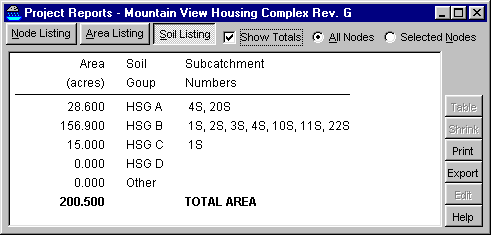 New Project Report Window
allows on-screen viewing of the traditional node listing and
area listing,
as well as the new Soil Group report. (see sample at right) To open the window, click the new
"Project Report" button on the toolbar.
New Project Report Window
allows on-screen viewing of the traditional node listing and
area listing,
as well as the new Soil Group report. (see sample at right) To open the window, click the new
"Project Report" button on the toolbar.
Enhanced Message Window:
Right-click any message for time-saving short-cuts, including the ability to edit a
node or view the associated report, without having to return to the routing
diagram. A single-click continues to provide detailed help on any
message. Reach tailwater messages have been simplified, making it easier
to identify conditions that may require special attention.
A Frequency Factor can now be
set for Rational Method, allowing automatic adjustment of C-values for larger
storms. The factor can be entered manually on the
Rainfall
tab, or specified for each event within the IDF file.
Wall Thickness can now be
specified for most embedded storage volumes, allowing automatic adjustment for
thick-walled chambers, including pre-cast concrete chambers (see below).
 Concrete galleys and leaching
chambers have been added to the library of prefabricated storage chambers.
Details here.
(See sample
View|Chamber
report at right)
Concrete galleys and leaching
chambers have been added to the library of prefabricated storage chambers.
Details here.
(See sample
View|Chamber
report at right)
Expanded hydrograph import: A
file link can now import tabular CSV hydrograph data, including hydrographs with
an uneven time step. Additional text file formats are supported for
importing hydrograph data from other hydrology programs.
TR-20 Data Files can be
automatically imported to an equivalent HydroCAD file with the new
Project|Import|TR-20 command. Most TR-20
commands are fully implemented, including custom rainfall tables and Unit
Hydrograph definitions. Details here.
Other
enhancements include additional rainfall files, plus the ability to set the
peak time for a Chicago-style rainfall. Setup program updated for
Windows Vista. As always, this update can open any previous HydroCAD project
file. Click here for technical details on
all the changes.
Also read about new features in the previous HydroCAD-8 release
Also see the new features added in the subsequent HydroCAD-9 release.